image_pdfimage_print

GPU Cluster with eight A100

Getting started with Pytorch using Cuda acceleration

This tutorial gives an instruction on installing Cuda and enabling Cuda acceleration using Pytorch in Win10. Installation in Linux or Mac systems are all possible. An additional .py file will verify whether the current computer configuration uses the Cuda or not. The following instruction assumes that you have already installed Python IDE, e.g., Anaconda, Pycharm, Visual Studio…

Step 1: Check which Cuda version is supported by your current GPUs under this website. From the left figure, we can see that A100 supports Cuda 11.0. It is also reported from other blogs/ forums that A100 can support Cuda 11.1. In this post, we install Cuda 11.1.

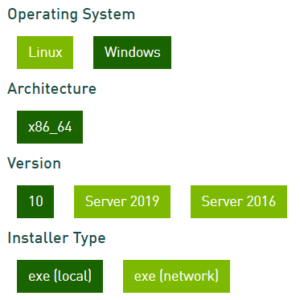
Step 2: Download Nvidia Cuda Toolkit 11.1 (the same version as Cuda in Step 1) from the website. In Win10, for instance, we follow up the choice as shown right. The size of exe(local) is around 3.1GB. After downloading, run the .exe and perform installation. It may take some minutes to complete installation.

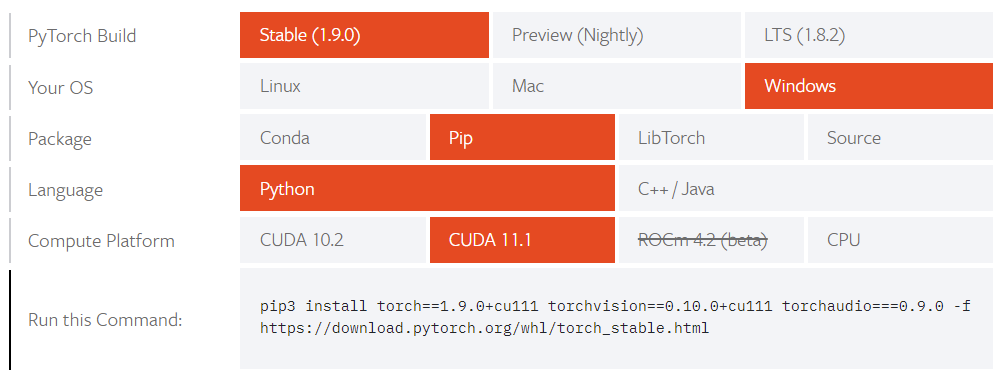
Step 3: On the homepage of Pytorch, choose the appropriate options as shown in the left figure. IMPORTANT: The cuda version must be the same as in Step 1. It is also recommended to use Stable version. After finishing the , copy the command into Anaconda Powershell Prompt or other command prompt where you install packages for Python. Waiting for the installation, which may require larger than 1GB disk space and takes some minutes for installation. You could also find historical version of Pytorch in that homepage.

Verify your installation with .py file

You could download a cuda-test.py file and run it. If the result shows ‘cuda’, then you can enjoy the Cuda acceleration for training neural networks!

Using Multiple GPUs for further acceleration

Running Pytorch with Multiple GPUs can further increase the efficiency. We have 8 GPU cards and can be used parallely for training. Please refer to (1) (2) (3) for details. 

Getting started with LEGO MINDSTORMS Education EV3

What can you do with the LEGO robot sets?

The LEGO Mindstorms Education EV3 sets can be used in different scenarios. They offer a quick and easy introduction into robot control, motion planning and visual navigation from depth images with Python. One can assemble the robots in various ways with different sensors and motors depending on the desired task. 

For more information go to Robot LEGO Robotics EV3 Dev and to https://pypi.org/project/python-ev3dev2/ .

Prerequisites

First of all a development set is necessary. At the chair of Cyber-Physical Systems we have five sets available for students. The implementation of the python code and connection to the EV3 can be done with Visual Studio Code and the extension LEGO MINDSTORMS EV3 MicroPython. The EV3 bricks are equipped with a micro-SD card on which the Micropython Image is installed. A more detailed installation guide is provided on GitHub.

Example - Motor control

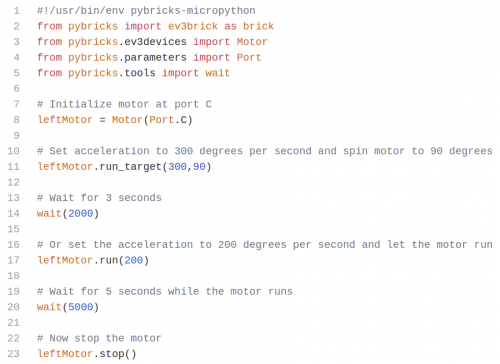
In the following is an example python code to control a motor with the EV3. At the beginning the motor has to be initialized with the corresponding port (line 8). There are two different ways to control a motor. First, one can set a desired acceleration and target position to run the motor (line 11). Or one can set the desired acceleration and let the motor run until it is stopped by a command (line 17-23). 

Demo

If you want to get the python code or if you are interested in other example codes go to our GitHub repository or to this repository: https://github.com/bittner/lego-mindstorms-ev3-comparison#inspiration-for-lego-ev3-robots

Simulation Tools

You may also build your LEGO robot model in a simulation tool and test your Python algorithms. Here is a list of projects:

Here is a list of 3D Modelling Tools for LEGO systems:

Building a Cyber-Physical-System (CPS)

A CPS combines the predictions or commands of computer simulations (see the section on Simulation Tools) and offers a real-time visualization of the real system and the environment. 

Such a CPS can also be developed with our LEGO Ev3 robots. Current sensor measurements can be communicated in real-time to a simulation and visualization tool via bluethooth or wifi connections. Here is a collection of relevant resources:

Deep Reinforcement Learning for Navigation in Warehouses

Deep Reinforcement Learning (DRL) has demonstrated great success in learning single or multiple tasks from scratch. Various DRL algorithms have been proposed and were applied in a broad class of tasks including chess and video games, robot navigation or robot manipulation. 

In this work, we investigate the potential of DRL in a mapless navigation task within a warehouse. The challenges of the task are the partial observability of the space and the need of effective exploration strategies for fast learning of navigation strategies. 

We trained a mobile robot (the agent) from scratch and compared how different sensor observations could influence the navigation performance. The evaluated sensors are a 360-degree Lidar sensor, only depth image and only RGB image. For Lidar and RGB inputs, we evaluated partial and full observability of the state space. We successfully trained the agent to navigate to a goal with a reward setting that is also applicable to the real world.

Currently, we are extending the work to multi-modal sensor inputs with both Lidar and RGB inputs (RGB image only frontal view) and incorporated self-curriculum learning on a more challenging navigation task in a warehouse and obtained promising initial outcomes.

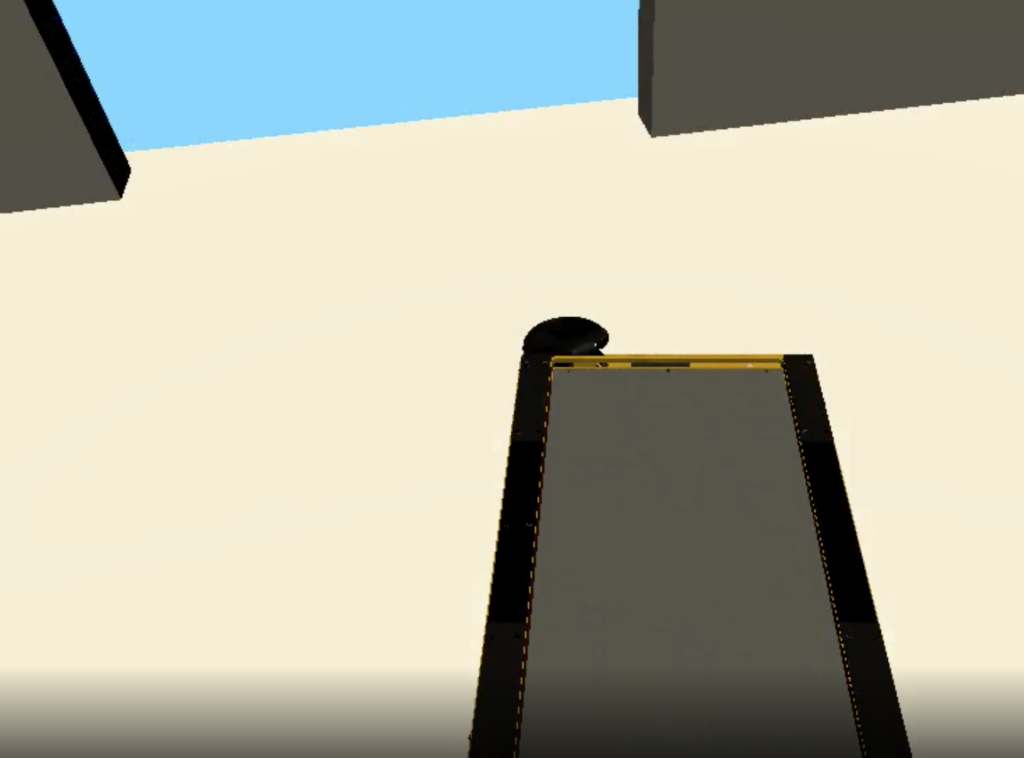
The video shows learned navigation strategies using a single RGB-D camera mounted at the front of the robot.  The results were obtained after 85.000 interactions (single action excution, e.g. wheel velocity commands). 

This video shows the learnded strategy after 140.000 interactions with the environment. 

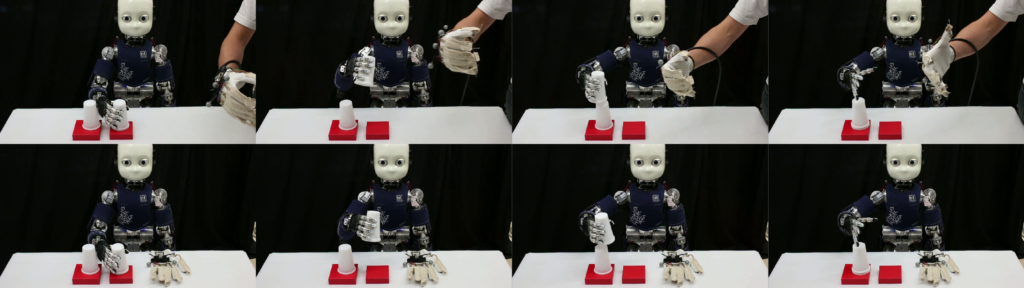
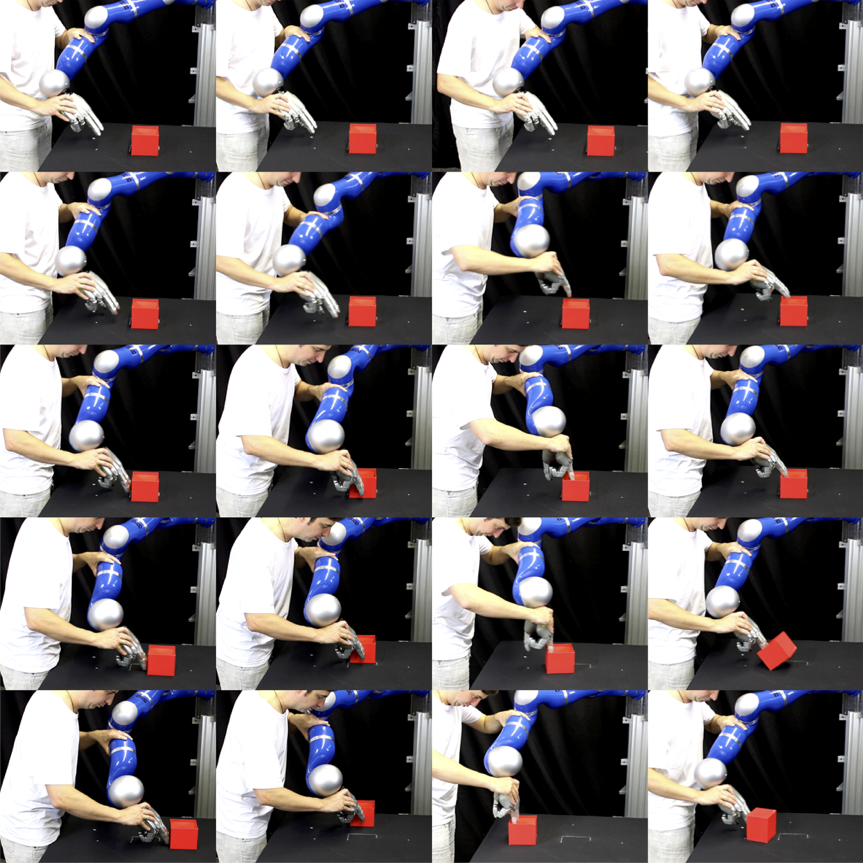
Intrinsic Motivation Learning in Stochastic Neural Networks

Video

Link to the file

You may use this video for research and teaching purposes. Please cite the Chair of Cyber-Physical-Systems or the corresponding research paper. 

Publications

2019

Tanneberg, Daniel; Peters, Jan; Rueckert, Elmar

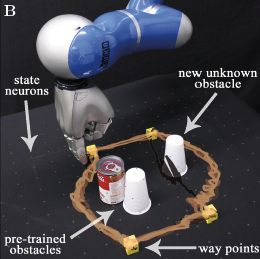
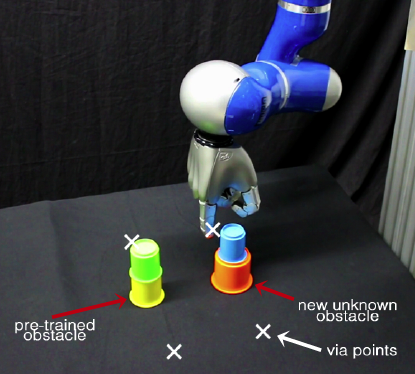
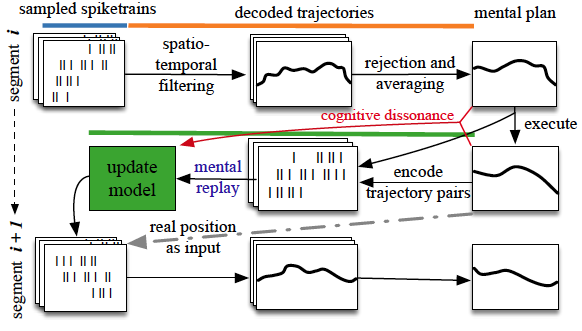
Intrinsic Motivation and Mental Replay enable Efficient Online Adaptation in Stochastic Recurrent Networks Journal Article

In: Neural Networks – Elsevier, vol. 109, pp. 67-80, 2019, ISBN: 0893-6080, (Impact Factor of 7.197 (2017)).

Links | BibTeX

Intrinsic Motivation and Mental Replay enable Efficient Online Adaptation in Stochastic Recurrent Networks

2017

Tanneberg, Daniel; Peters, Jan; Rueckert, Elmar

Efficient Online Adaptation with Stochastic Recurrent Neural Networks Proceedings Article

In: Proceedings of the International Conference on Humanoid Robots (HUMANOIDS), 2017.

Links | BibTeX

Efficient Online Adaptation with Stochastic Recurrent Neural Networks

Tanneberg, Daniel; Peters, Jan; Rueckert, Elmar

Online Learning with Stochastic Recurrent Neural Networks using Intrinsic Motivation Signals Proceedings Article

In: Proceedings of the Conference on Robot Learning (CoRL), 2017.

Links | BibTeX

Online Learning with Stochastic Recurrent Neural Networks using Intrinsic Motivation Signals

150.570 Seminar Bachelor Work – Industrial Data Science (5SH SE, WS & SS)

You are interested in working with modern robots or want to understand how such machines ‘learn’?

If so, this bachelor thesis will enable you to dig into the fascinating world of robot learning. You will implement and apply modern machine learning algorithms in Python, Matlab or C++/ROS. 

Your learning or control algorithm will be evaluated in cyber-physical-systems. Find out which theses are currently supervised and offered


Links and Resources

Location & Time

Learning objectives / qualifications

  • Students will work on controlling, modeling and simulating Cyber-Physical-Systems and autonomously learning systems.
  • Students understand and can apply advanced model learning and reinforcement  techniques to real world problems.
  • Students learn how to write scientific reports.

Literature

  • The Probabilistic Machine Learning book by Univ.-Prof. Dr. Elmar Rueckert. 
  • Bishop 2006. Pattern Recognition and Machine Learning, Springer. 
  • Barber 2007. Bayesian Reasoning and Machine Learning, Cambridge University Press
  • Murray, Li and Sastry 1994. A mathematical introduction to robotic manipulation, CRC Press. 
  • B. Siciliano, L. Sciavicco 2009. Robotics: Modelling,Planning and Control, Springer.
  • Kevin M. Lynch and Frank C. Park 2017. MODERN ROBOTICS, MECHANICS, PLANNING, AND CONTROL, Cambridge University Press.

150.510 Industrial Data Science Projekt (8SH SE, SS)

You are interested in working with modern robots or want to understand how such machines ‘learn’?

If so, this project will enable you to dig into the fascinating world of robot learning.

The course provides a structured and well motivated overview over modern techniques and tools which enable the students to define learning problems in Cyber-Physical-Systems. 

Links and Resources

Location & Time

Learning objectives / qualifications

  • Students get a practical experience in working, modeling and simulating Cyber-Physical-Systems.
  • Students understand and can apply advanced model learning and reinforcement  techniques to real world problems.
  • Students learn how to write scientific reports.

Literature

  • The Probabilistic Machine Learning book by Univ.-Prof. Dr. Elmar Rueckert. 
  • Bishop 2006. Pattern Recognition and Machine Learning, Springer. 
  • Barber 2007. Bayesian Reasoning and Machine Learning, Cambridge University Press
  • Murray, Li and Sastry 1994. A mathematical introduction to robotic manipulation, CRC Press. 
  • B. Siciliano, L. Sciavicco 2009. Robotics: Modelling,Planning and Control, Springer.
  • Kevin M. Lynch and Frank C. Park 2017. MODERN ROBOTICS, MECHANICS, PLANNING, AND CONTROL, Cambridge University Press.

Responsibilities & Contacts

This post provides information on whom to contact depending on your purpose.

Note that this post is continuously updated to keep the contact persons up-to-date. 

If you discover out-dated information, please contact our secretary


Bettina Sokol

  • Bewerbungen Wissenschaftliches Personal. 

Bettina.Hotter@unileoben.ac.at

Für Absagen: xyz@unileoben.ac.at

Karin Taxacher

  • Bewerbungen Nicht-Wissenschaftliches Personal. 

Sabine Fluch

  • CISCO telephone stations for new employees. 

Kathrin Moitzi

Julia Schmidbauer

  • Knowledge- and Technology Transfer & Business Partnerships

Moodle Courses

SAP GUI MAC

Robot How to Build a USB Controlled Treadmill

This post discusses how to develop a low cost treadmill with a closed-loop feedback controller for reinforcement learning experiments.

MATLAB and JAVA code is linked.

Code & Links

The Treadmill

  • Get a standard household treadmill Samples
  • Note: It should work with a DC-Motor, otherwise a different controller is needed!
 

The Controller and the Distance Sensor

  • Pololu Jrk 21v3 USB Motor Controller with Feedback or stronger (max. 28V, 3A)
  • Comes with a Windows Gui to specify the control gains
  • Sharp distance sensor GP2Y0A21, 10 cm – 80 cm or similar
  • USB cable
  • Cable for the distance sensor
  • Power cables for the treadmill
  • Controller User Guide by Polo

The Matlab Interface

  • Get the java library  build or the developer version, both from Sept 2015 created by E. Rueckert.
  • Run the install script installFTSensor.m (which add the jar to your classpath.txt)
  • Check the testFTSensor.m script which builds on the wrapper class MatlabFTCL5040Sensor (you need to add this file to your path)
 

Robot LEGO Robotics EV3 Dev

LEGO EV3 for Robotic Tasks

We have five EV3 sets and use them for studying robot control, motion planning and visual navigation from depth images. 


We use our GitHup LEGO Python project for our developments. 

Tactile Sensing

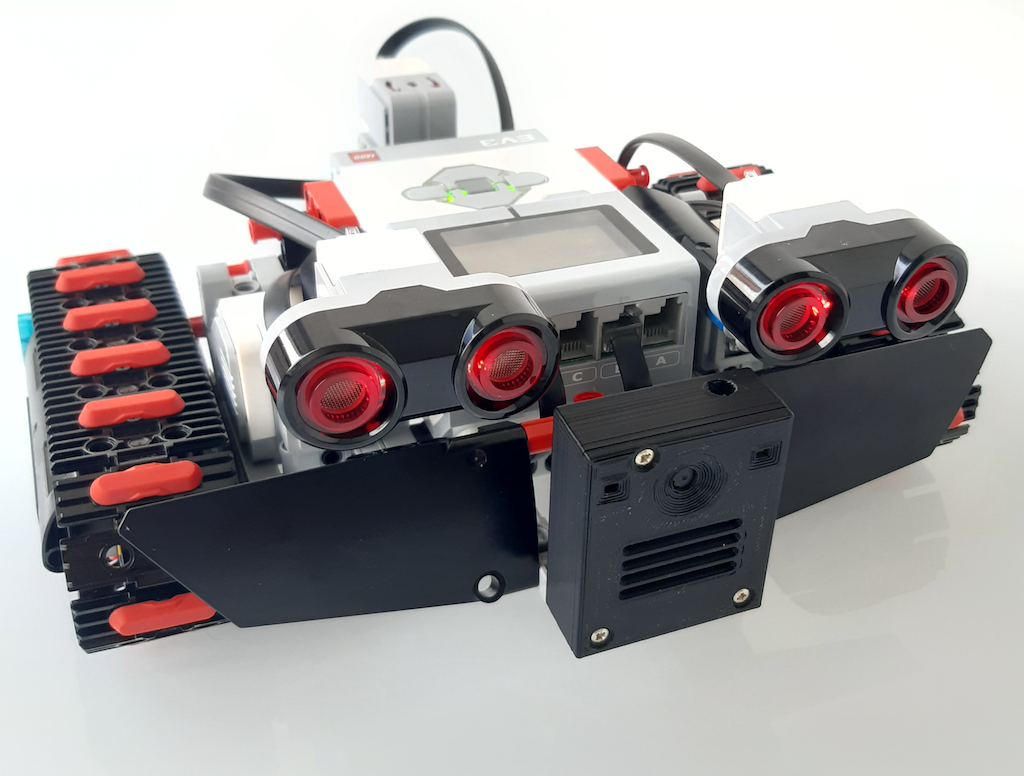
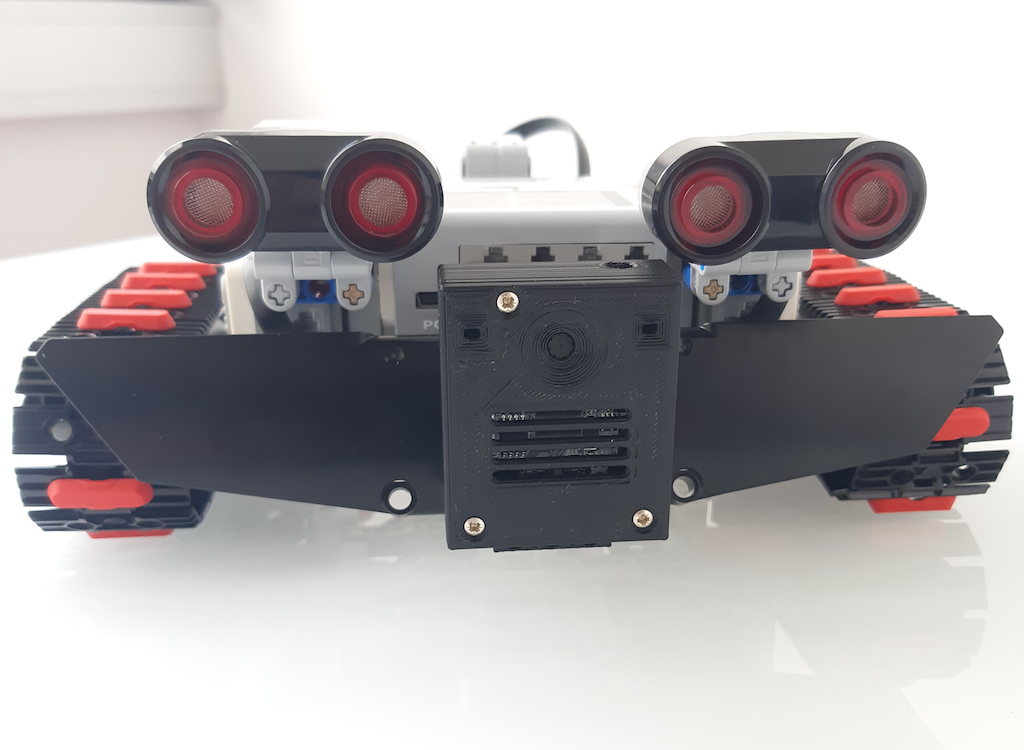
Several special purpose sensors including depth image cameras (shown in the center in the image), IMUs, accelerometers, gyroscopes, sonic sensors (two are shown in the image), etc. can be connected to the EV3 brick. 

The EV3 systems can be used to explore neural sensor fusion approaches, embedded computing implementations and classical mobile robotics tasks.  


Videos